
I Hate AI Notetakers, Too—So I Found One That’s Actually Invisible
From Pain Points to PRDs: Reclaiming 2 Hours of Your PM Life Every Day

As a Product Manager, your day is a marathon of context-switching. You jump from a high-stakes strategy session with the leadership to a granular technical deep-dive with engineering, only to end the day with a customer interview. By the time you sit down to write your PRDs or update the roadmap, you’ve likely forgotten 70% of what was actually said.
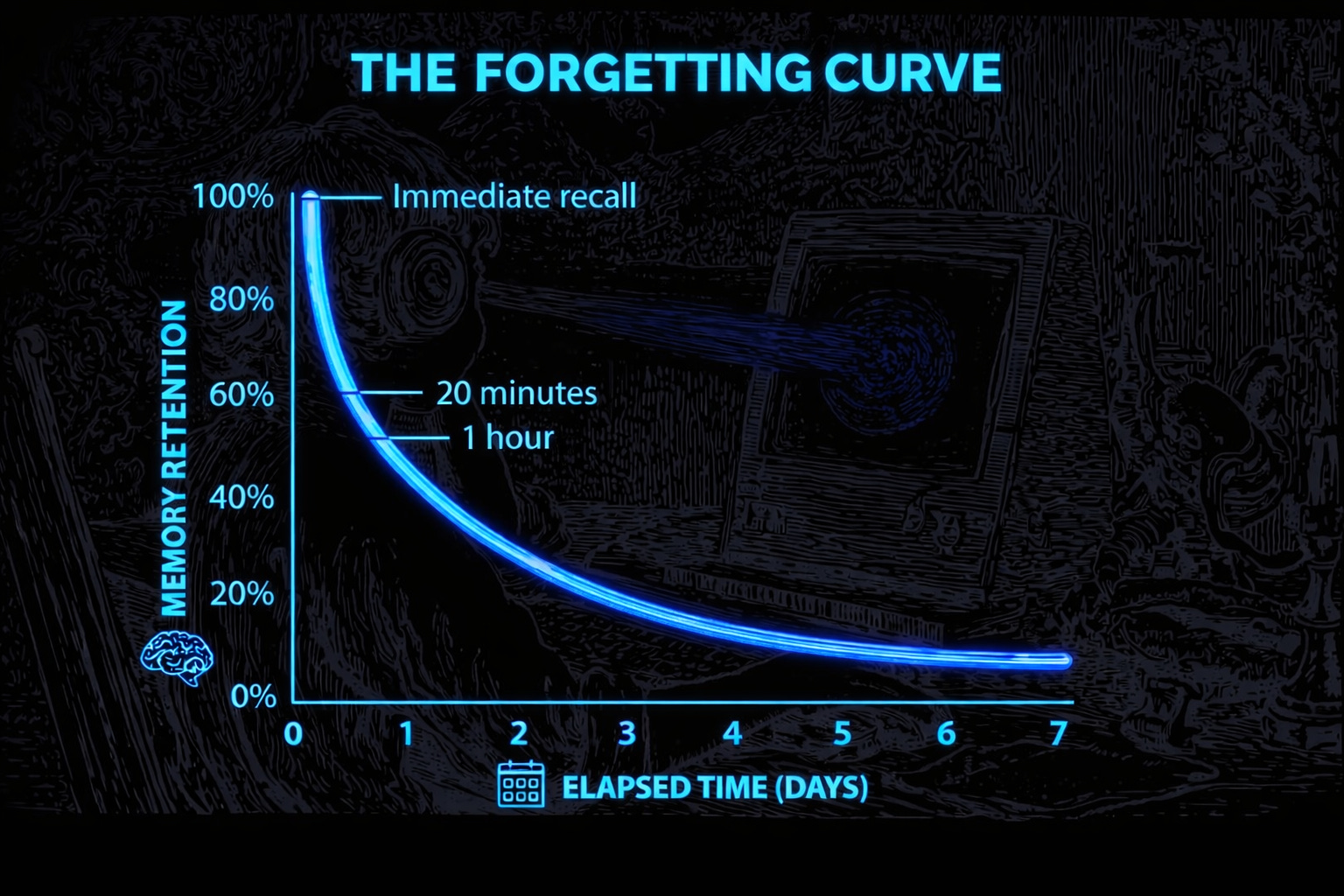
This is the Ebbinghaus Forgetting Curve in action. Your brain isn’t a tape recorder; it’s a storyteller that fills in gaps with assumptions. If you’ve ever spent a week building a feature only to realize the VP never actually asked for it, you’ve experienced the “Shared False Memory” trap.
The Group Hallucination: Why Your Roadmap is at Risk
It’s one thing to forget a meeting; it’s another to collectively “invent” one. In groups, this phenomenon turns dangerous. Research shows that teams often walk out of a room with shared false memories, convinced the CEO issued a directive that she never actually said.
You implement a non-existent strategy, and six months later, no one even questions it because everyone “remembers” it clearly. I’ve seen a client team waste three entire weeks building a feature their VP supposedly “asked for”. The transcript later proved she never mentioned it, yet four senior people would have sworn on their careers that she did.
The hard truth?
Your memory is just a piece of fan fiction you wrote about the meeting after it ended.
The Failed Fixes of the Past
We’ve all tried the standard “productivity” hacks, and we know why they fail:
Manual Note-taking: You split your focus. While you’re typing the last sentence, you’re missing the next one. You capture words, but you aren’t actually present to lead the conversation. And let’s be honest: you’ll never look at those notes again.
The “Audio Graveyard”: You hit record, creating 47 minutes of audio that will sit in a folder until the end of time. We both know you aren’t going to replay it.
The Bot Invasion: You invite an AI notetaker, and suddenly the vibe shifts. People talk differently when a bot is watching. You end up with a generic “nothing-summary” that tells you the team “discussed priorities”—which helps exactly no one.
You eventually give up and Slack a colleague: “Hey, what did we actually decide?”.
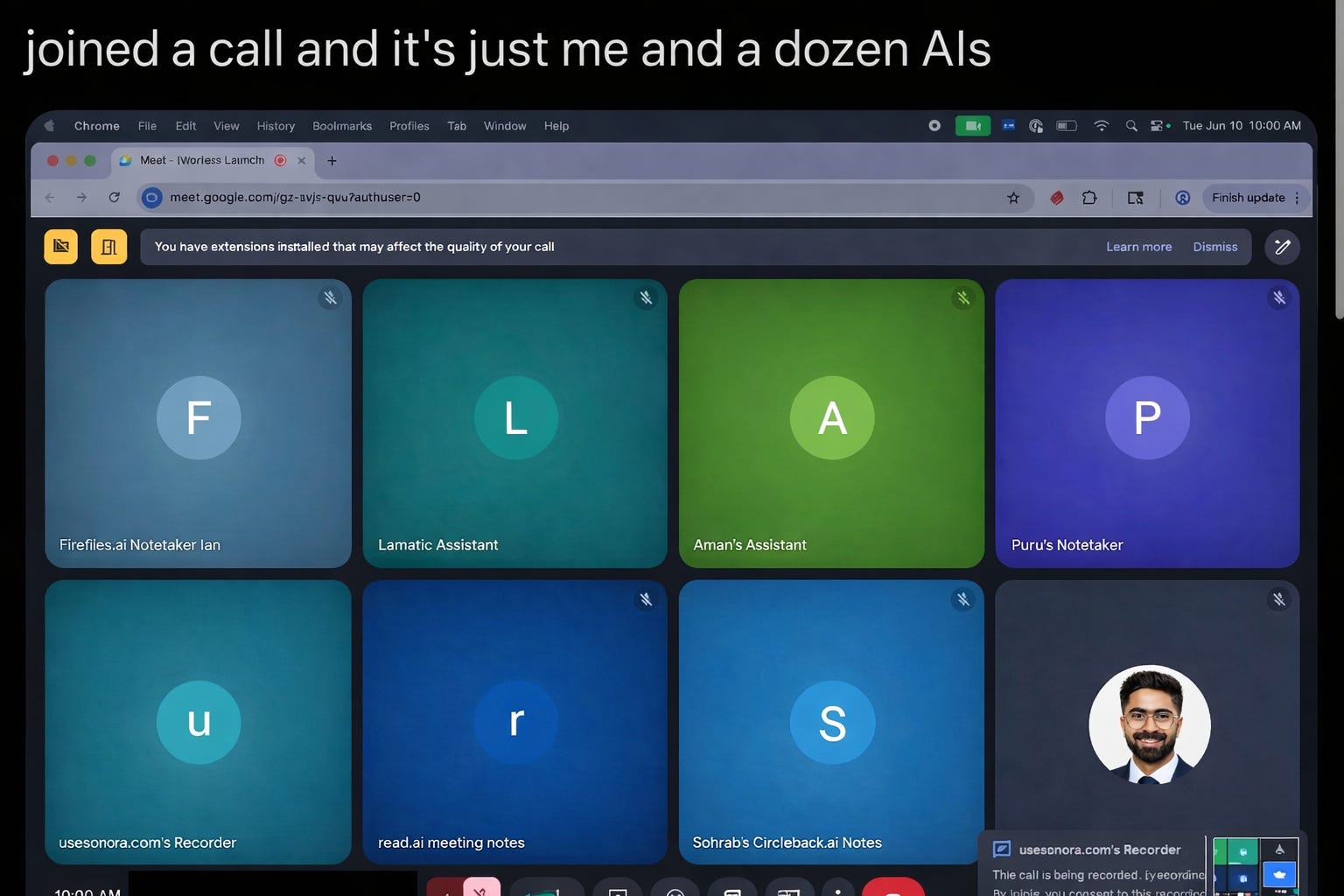
I’ll say it plainly: I hate AI notetakers.
You know the ones. You join a Google Meet or Zoom, and instead of a focused group of humans, you see a dozen “Assistants” and “Recorders” staring back at you. It’s a nightmare straight out of a Black Mirror episode.
When a bot joins, the room changes. People stop speaking freely. They filter their thoughts because they know a “gray circle” is transcribing their every word for a generic summary you probably won’t even read. We’ve reached a point where we should almost shame the use of these intrusive bots—they destroy the very “realness” of the conversation they’re trying to capture.
For a long time, I thought note-taking simply wasn’t a solved problem. I went back to scribbling poor, disjointed notes just to avoid the “Bot Invasion.”
Then, I found Granola
The “Invisible” Advantage: Why Granola is Different
Unlike typical AI notetakers, Granola is a local app. It doesn’t join your call as a participant. It simply listens to your device audio, transcribing in the background while you stay 100% present in the conversation.
The "Ghost" Mode: No bot joins the call. Granola runs locally, capturing audio directly from your device. Because there is no "AI Notetaker" circle visible to others, the conversation remains natural and authentic. You get the real story, not the filtered version.
Privacy First: Your data remains yours. Granola doesn’t store your audio—only the transcripts, which you control completely. This allows you to stop typing entirely and stay fully engaged in the meeting.
Fully Focused: You don’t have to type a single word during the call. You can finally look your customers in the eye (digitally) and catch the nuance you’d usually miss while frantically taking notes.
The Power of "Recipes": Beyond being invisible, Granola allows you to build custom prompts—what they call "Recipes"—to automate your most tedious tasks.
I know you’re already thinking about it: you want to copy my personal prompts. This is the #1 reason I’ve abandoned every other AI tool.
No More Copy-Paste Fatigue
The genius of Granola is its built-in AI chat. You don’t need to export text or juggle tabs with Claude or ChatGPT. You simply type “/” directly within your transcript to run a Recipe and get your output instantly.
<video>
Prompt 1: TLDR so-short-you-have-to-read it.
Default AI summaries are three paragraphs of nothing.
I need two bullets I’ll actually look at.
Link for direct access → https://recipes.granola.ai/r/7bc211bc-6278-4a78-a56b-d45630b72056 But if you want to recreate it, here’s the exact prompt I use:
You are summarizing a meeting for someone who is extremely busy and will only read something if it’s shockingly short. Your job is to distill the meeting provided into a single TLDR that is so brief, skipping it would feel ridiculous.
RULES:
Maximum 2 bullet points total
Each bullet must be under 12 words
No fluff, greetings, or preamble
No “In summary...” or “Key takeaways include...” — just the points
Only include what actually matters: decisions made, actions required, or critical information
If nothing important happened, say “Nothing worth your time.”
FORMAT:
[Most important thing, the 80%]
[Second most important thing, the 20%]
That’s it. Nothing else.
What you get back:
Aman owns the pricing proposal by Friday.
We’re not launching in Q1 anymore.
That’s it. The meeting in ten seconds.
Quick How-To for Granola Recipe.
How to create your own Granola Recipe:
Go to your Granola account.
Go to the bottom left “Recipe”.
Click on “Create a Recipe on the top right”.
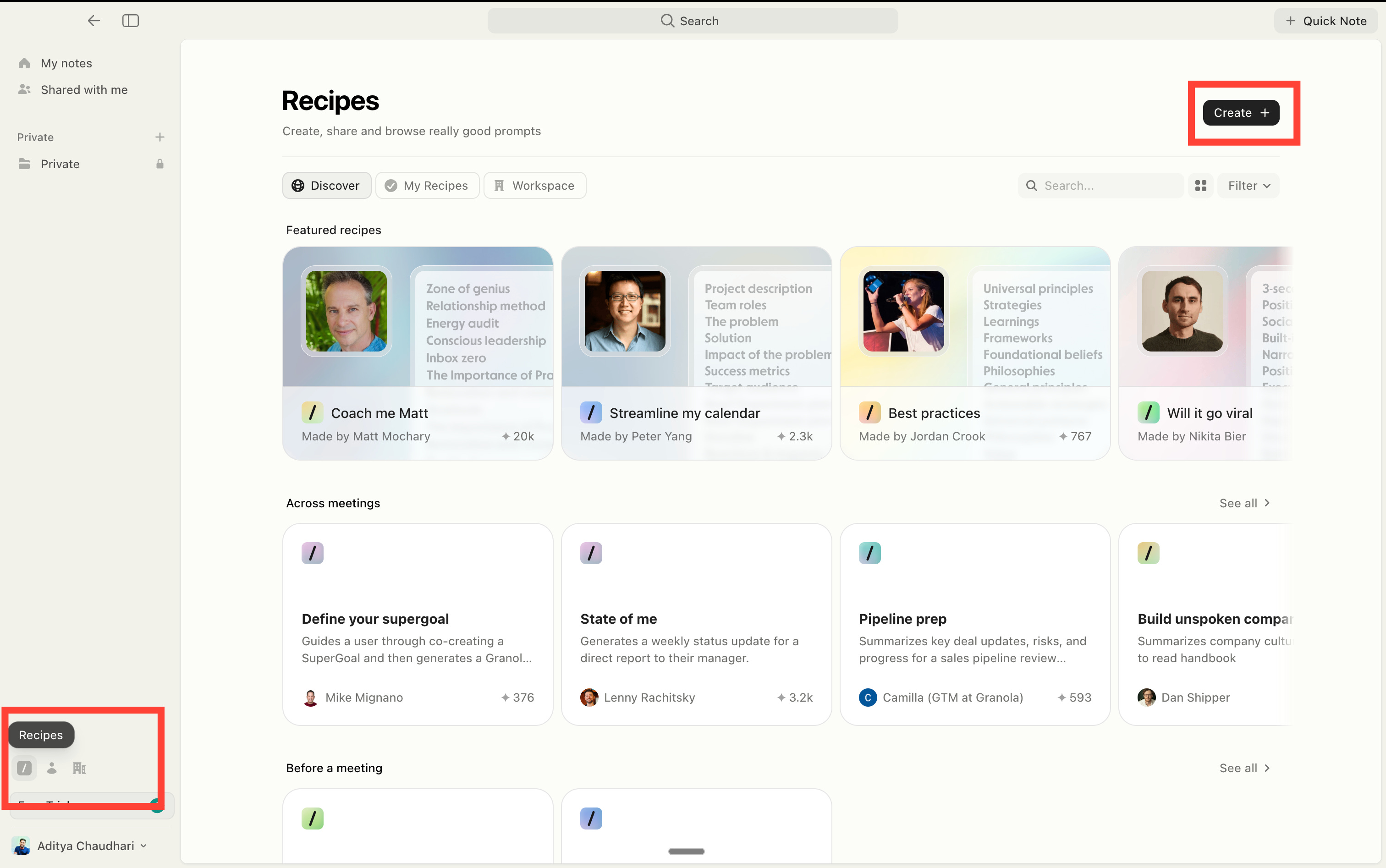
And then it’s quite simple.
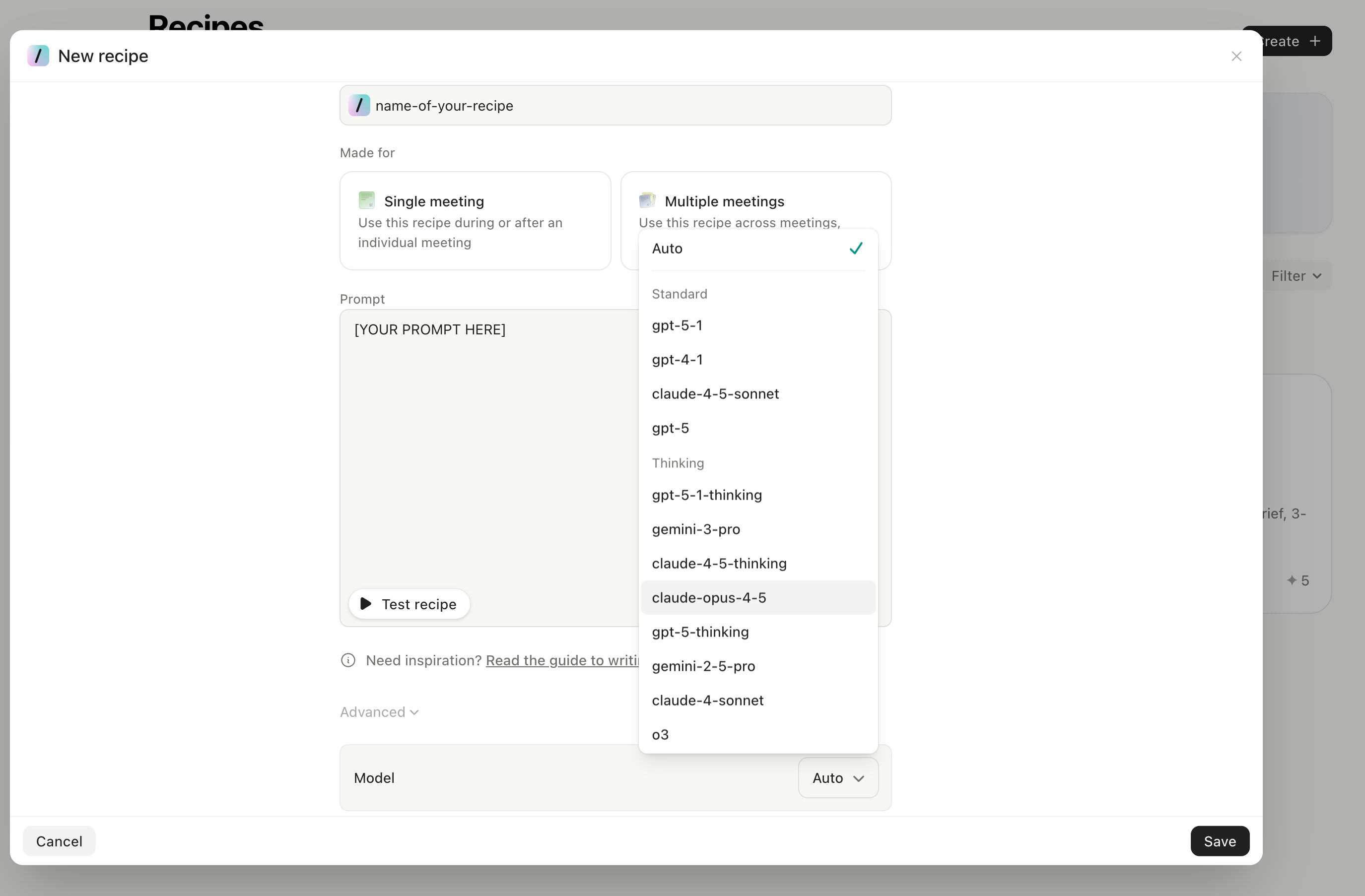
Type your name at the top (you will access it with / ).
The prompt part is the most important one. Copy mine or do yours.
Select the model. My favorite is claude-opus-4-5.
Make it for single meetings or multi-meetings.
PS: If you struggle to make your own Recipe, leave a comment.
I’ll help you prompt it.
Prompt 2: Action items, nothing more.
Default action items are vague. “Follow up on discussion.”
Follow up on what? With who? By when?
I made a Recipe for that. My action items, nothing more.
The link for direct access → https://recipes.granola.ai/r/43347a99-e934-4972-8a88-cef1b9c7b27d
Or here’s the exact prompt of my Recipe:
You are reviewing a meeting to extract action items assigned to a specific person. Your job: Find and list of the action items assigned to the people the user will mention. It could be multiple people.
Rules:
- Output action items as bullet points only
- No introduction, greeting, summary, or closing remarks
- No headers or section titles
- If an action item has a deadline mentioned, include it in parentheses at the end
Example of an output format:
[name]
- Send the updated contract to legal (by Thursday)
- Book the venue for the offsite
- Review David’s proposal and share feedback
- Circle back with the client about pricing
Now I know exactly what I owe. Just what was actually said.
The “I never forget meeting” workflow.
Meeting starts.
Granola takes notes on the background.
Meeting ends.
Open Granola.
Type “/” → run the TLDR prompt → 2 bullets essence.
Type “/” → run the action items prompt → copy to Slack or Notion.
Done.
Two minutes. Every meeting.
No more “wait, what did we decide?”
You finally remember more than 30% after a day.
And you can still hate on AI notetakers bots. Shame them, really.
If you agree, say it louder in the comments.